实验记录
网络初始构造
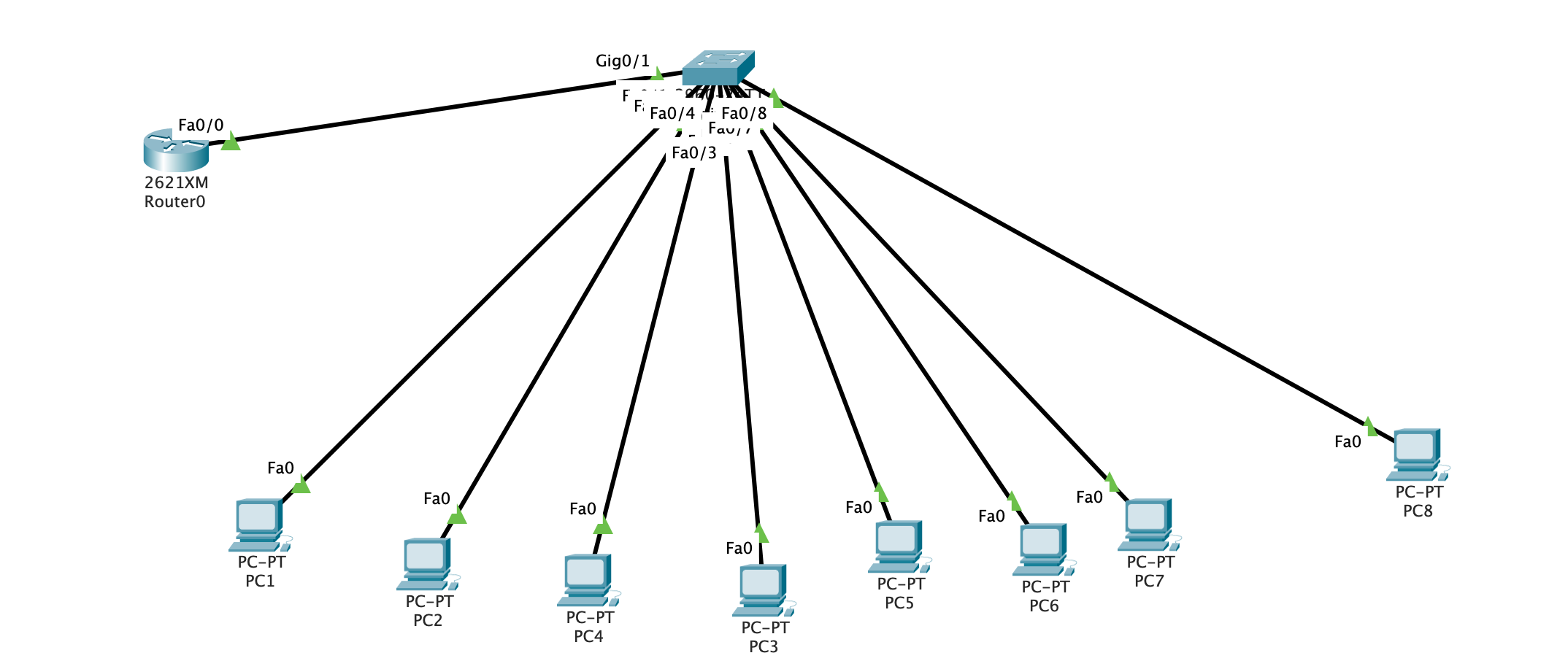
网络构造如图所示:
PC1,2,4属于VLAN2, 其他的属于VLAN3, 其中PCn的ip为192.168.{vlan}.n0.
例如, pc1属于vlan2, ip为192.168.2.10.
配置交换机
1
2
3
4
5
6
7
8
9
10
11
12
13
14
15
16
17
18
19
20
21
22
23
24
25
26
27
28
Switch(config)#interface FastEthernet0/1 Switch(config-if)#switchport access vlan 2 Switch(config-if)#exit Switch(config)#interface FastEthernet0/2 Switch(config-if)#switchport access vlan 2 Switch(config-if)#exit Switch(config)#interface FastEthernet0/3 Switch(config-if)#switchport access vlan 3 Switch(config-if)#exit Switch(config)#interface FastEthernet0/4 Switch(config-if)#switchport access vlan 2 Switch(config-if)#exit Switch(config)#interface FastEthernet0/5 Switch(config-if)#switchport access vlan 3 Switch(config-if)#exit Switch(config)#interface FastEthernet0/6 Switch(config-if)#switchport access vlan 3 Switch(config-if)#exit Switch(config)#interface FastEthernet0/7 Switch(config-if)#switchport access vlan 3 Switch(config-if)#exit Switch(config)#interface FastEthernet0/8 Switch(config-if)#switchport access vlan 3 Switch(config-if)#exit Switch(config)#interface GigabitEthernet0/1 Switch(config-if)# Switch(config-if)#switchport mode trunk
查看VLAN 1 2 3 4 5 6 7 8 9 10 11 12 13 14 15 16 Switch#show vlan brief VLAN Name Status Ports ---- -------------------------------- --------- ------------------------------- 1 default active Fa0/9 , Fa0/10 , Fa0/11 , Fa0/12 Fa0/13 , Fa0/14 , Fa0/15 , Fa0/16 Fa0/17 , Fa0/18 , Fa0/19 , Fa0/20 Fa0/21 , Fa0/22 , Fa0/23 , Fa0/24 Gig0/2 2 VLAN2 active Fa0/1 , Fa0/2 , Fa0/4 3 VLAN3 active Fa0/3 , Fa0/5 , Fa0/6 , Fa0/7 Fa0/8 1002 fddi-default active 1003 token-ring-default active 1004 fddinet-default active 1005 trnet-default active
配置单臂路由
1 2 3 4 5 6 7 8 9 10 11 12 13 14 15 16 17 18 19 Router(config)#int fastEthernet 0/0.1 Router(config-subif)# %LINK-5-CHANGED: Interface FastEthernet0/0.1, changed state to up %LINEPROTO-5-UPDOWN: Line protocol on Interface FastEthernet0/0.1, changed state to up Router(config-subif)#encapsulation dot1Q 2 Router(config-subif)#ip address 192.168.2.1 255.255.255.0 Router(config-subif)#exit Router(config)#int fastEthernet 0/0.2 Router(config-subif)# %LINK-5-CHANGED: Interface FastEthernet0/0.2, changed state to up %LINEPROTO-5-UPDOWN: Line protocol on Interface FastEthernet0/0.2, changed state to up Router(config-subif)#encapsulation dot1Q 3 Router(config-subif)#ip address 192.168.3.1 255.255.255.0 Router(config-subif)#exit
测试
pc1 ping pc5
1
2
3
4
5
6
7
8
9
10
11
12
13
C:\>ping 192.168 .3 .50 Pinging 192.168 .3 .50 with 32 bytes of data: Reply from 192.168 .3 .50 : bytes=32 time=2 ms TTL=127 Reply from 192.168 .3 .50 : bytes=32 time=1 ms TTL=127 Reply from 192.168 .3 .50 : bytes=32 time<1 ms TTL=127 Reply from 192.168 .3 .50 : bytes=32 time=38 ms TTL=127 Ping statistics for 192.168 .3 .50 : Packets: Sent = 4 , Received = 4 , Lost = 0 (0 % loss), Approximate round trip times in milli-seconds: Minimum = 0 ms, Maximum = 38 ms, Average = 10 ms
小结
注意配置sub interface时, 必须手动开启802.1Q协议