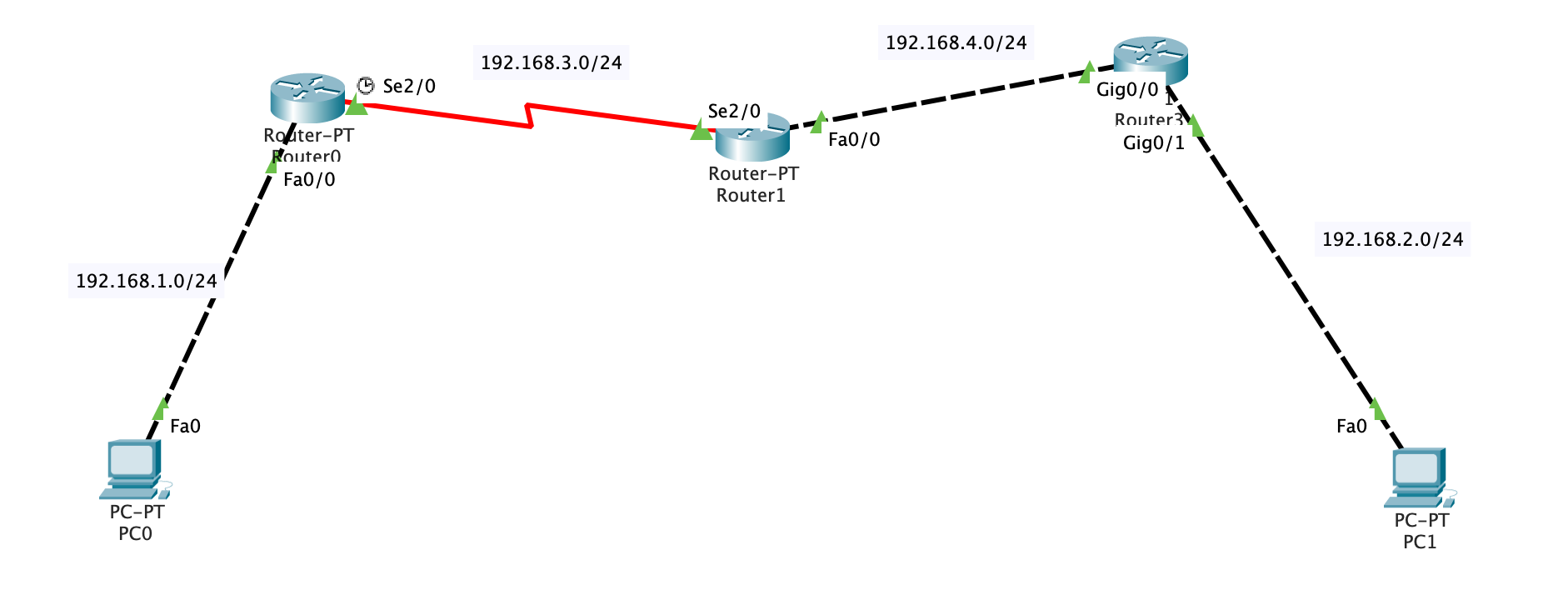
Ping statistics for192.168.2.2: Packets: Sent = 4, Received = 4, Lost = 0 (0% loss), Approximate round trip times in milli-seconds: Minimum = 1ms, Maximum = 23ms, Average = 17ms
正常
配置eigrp
以配置r3为例
1
2
3
4
5
6
7
8
9
10
Router>enable Router# Router#configure terminal Enter configuration commands, one per line. End with CNTL/Z. Router(config)#router eigrp 100 Router(config-router)#network 192.168.4.0255.255.255.0 Router(config-router)# %DUAL-5-NBRCHANGE: IP-EIGRP 100: Neighbor 192.168.4.1 (GigabitEthernet0/0) is up: new adjacency
Router>enable Router# Router#configure terminal Enter configuration commands, one per line. End with CNTL/Z. Router(config)#router eigrp 100 Router(config-router)#network 192.168.4.0255.255.255.0 Router(config-router)#network 192.168.3.0255.255.255.0
配置r1:
1
2
3
4
5
6
7
Router>enable Router# Router#configure terminal Enter configuration commands, one per line. End with CNTL/Z. Router(config)#router eigrp 100 Router(config-router)#network 192.168.1.0255.255.255.0 Router(config-router)#network 192.168.3.0255.255.255.0
Router#show ip route
Codes: C - connected, S - static, I - IGRP, R - RIP, M - mobile, B - BGP
       D - EIGRP, EX - EIGRP external, O - OSPF, IA - OSPF inter area
       N1 - OSPF NSSA external type 1, N2 - OSPF NSSA external type 2
       E1 - OSPF external type 1, E2 - OSPF external type 2, E - EGP
       i - IS-IS, L1 - IS-IS level-1, L2 - IS-IS level-2, ia - IS-IS inter area
       * - candidate default, U - per-user static route, o - ODR
       P - periodic downloaded static route

Gateway of last resort is not set

C    192.168.1.0/24 is directly connected, FastEthernet0/0
D    192.168.2.0/24 [90/20517120] via 192.168.3.2, 00:00:55, Serial2/0
C    192.168.3.0/24 is directly connected, Serial2/0
D    192.168.4.0/24 [90/20514560] via 192.168.3.2, 00:02:39, Serial2/0

Router#ping 192.168.2.2

Type escape sequence to abort.
Sending 5, 100-byte ICMP Echos to 192.168.2.2, timeout is 2 seconds:
!!!!!
Success rate is 100 percent (5/5), round-trip min/avg/max = 1/10/32 ms
The optional network-mask argument was first added to the network statement in Cisco IOS Software Release 12.0(4)T. The mask argument can be configured in any format (such as in a network mask or in wild card bits). For example, you can use network 10.10.10.0 255.255.255.252 or network 10.10.10.0 0.0.0.3.